I found this recipe for making a copycat version of Lush Fun a while ago and thought it might be a good way to spend a Saturday afternoon. If you haven't used it before, Lush Fun is like a cross between soap and play-dough - you can use it in the bath or turn it into a dinosaur, or both.
I had some coconut scented shower gel that I thought might make a nice dough. The original recipe has liquid soap, cornflour, oil, and colouring. Plain white seemed like the right colour for coconut, and the shower gel was already quite moisturising, so I didn't think oil would be needed.
My recipe: put two heaped tablespoons of cornflour in a bowl, then add in a little shower gel and mix until smooth. Keep adding shower gel until you get a soft dough, then knead it until it's smooth and elastic.
Last week, while procrastinating from writing my thesis, I put up a short blog post about a common piece of financial advice, viz: "if you avoid buying your daily latte and instead put the money in a savings account, you could be a millionaire by the time you retire."
I was surprised by the response that it generated - a Reddit post brought in 20,000 views to the blog, then it was picked up by the New York Post, which, bizarrely, I found out about from an automated message on LinkedIn titled "You made the news!".
The post didn't contain any information that wasn't already widely available - the formula for compound interest with regular deposits is a standard that can be found in any finance textbook. I re-derived it as an interesting afternoon exercise. I was surprised by just how many people picked up on the £318,135.57 figure rather than using the formula to calculate something based on their own costs and interest rates, or even just looking at the graph.
There have been a few comments that have come up more than once, so I thought I'd make a post addressing them.
What point are you trying to make?
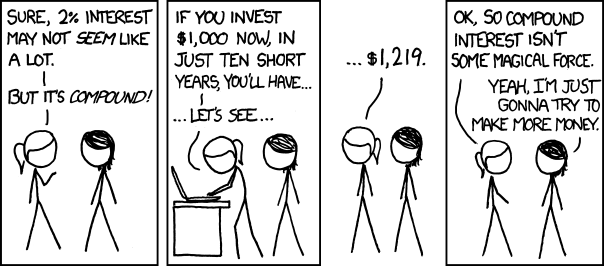
Not much of one, really. The cost of a latte every day won't get you to a million before you retire at realistic interest rates, but it would save you a fair amount of money if you were prepared to give it up. People have interpreted the post in diametrically opposed ways, either: "you can save lots of money and should do this", or "don't deny yourself the pleasures of life". Pick whichever one you prefer - it's your life, not mine. Do remember to bring your own cup, though - we've only got one planet.
There is a persistent belief that people earning minimum wage could also be millionaires, if only they wouldn't spend so much on luxuries. I think this idea comes from taking the ideas from books like The Millionaire Next Door, about the frugality of the rich, to strange extremes. According to the Household Spending Survey from the Office for National statistics, people with the lowest 10% of income spend an average of £1.04 per day on eating out and going on holidays (far less, incidentally, as a percentage of their income than any other income group). Getting rid of this spending would save £378.82 over the course of a year, and get you to millionairedom with an interest rate of 6% in just 87 short years. If you wanted to be a millionaire within 50 years with a 6% savings account, you'd need to cut almost £10 a day from your budget, and the data show that people on low incomes just aren't spending that much on non-essentials.
It's important to be realistic about the limits of frugality, and not to use faulty mathematical reasoning when making financial decisions.
Where the hell are you finding an interest rate of 6%?
The last time I switched savings accounts was pre-Brexit - things are looking a lot worse for interest rates these days! I go to MoneySavingExpert for financial advice, and the best regular saver seems to get you around 5% back, but the majority of ISAs are at more like 1.4%. Please adjust your calculations accordingly.
What about taxes, investing, and 401Ks?
Firstly, we don't have 401Ks in the UK, we have other pension arrangements, so I can't tell you a darned thing about those. I can't tell you anything about taxes or savings accounts in the USA either.
As far as taxes in the UK go, I reckon you're going to be under the PSA allowance or the ISA allowance each year, so presumably that shouldn't be a big problem, but do correct me in the comments if I've misunderstood.
I've gotten lots of comments along the lines of "if you use my stock market strategy, you can get 15% returns!" I have no idea what the best investment strategy for your money is. Feel free to adjust your calculations to whatever interest rate you think you can find.
Millennials spend too much on coffee!
According to that same Household Spending Survey from the Office for National Statistics, the under-30s in the UK spend less on coffee and eating out than older people of working age. There was a widely-shared tidbit that millennials spent more on coffee than on their retirement savings, but this was based on a small SurveyMonkey form and certainly isn't held up by the ONS data, or US consumer spending data.
If my latte costs £x and my interest rate is y%, and I save for n years, how much money would I save?
I put together a calculator. Assuming you put your latte money into your account as a lump sum at the end of the year:
Latte cost (£): Interest rate (% AER): Years:
You would save £____.
What if I only get a latte on work days, not every day?
Well, let's assume that you work 5 days a week, and get 28 days of holiday a year. The number of days you spend working in an average year will be:
Therefore our equation for yearly deposits becomes:
In the £3 latte, 6% interest, 50 years example from the post, if you only have a workday latte to forgo, you'd save £202,848.99
What if I deposit the money daily rather than as a lump sum at the end of the year?
There's been a lot of confusion in the comments between yearly and daily compounding interest.
The interest rate % you are shown when you apply for a bank account is the "annual equivalent rate" (AER). The AER tells you how much interest you would get if you put a lump sum in at the beginning of the year and then didn't add anything else.
In reality, most bank accounts work out your interest daily, and then pay it in at the end of the year. A yearly interest rate (AER) of applied to an initial deposit of £ should get you the same amount of money at the end of the year as a daily interest rate of applied every day, i.e. 365.25 times. Therefore, using the classic formula for compound interest ():
Rearrange to get in terms of :
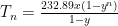
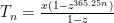
The equation we used for yearly compounding interest becomes:
Where is the total money you have at the end, is the cost of your latte, is your daily interest rate that we calculated above, and is the number of years that you want to save for.
You'd make extra money saving every day rather than at the end of the year. In the example I used in my original post, with a £3 latte at 6% interest for 50 years, you'd make £327,560.82 rather than £318,135.57, a not inconsiderable difference of £9,425.25 (although still notably not a million).
The daily model of saving is probably a more realistic one than my original, yearly lump sum model, so let's make a calculator for that, too:
Latte cost (£): Interest rate (% AER): Years:
You would save £____.
If you want to work out accurate daily interest calculations for lattes bought only on work days, you're on your own unless you feel like sending me your holiday schedules for the next 50 years. As a rough estimate, you could multiply your latte cost by and use the above calculator.
If you'd like to get email updates from me, sign up to my mailing list!
Edit: This got picked up by the New York Post - hi to everybody who clicked through from there.
An idea oft floated around the internet is: "if you avoid buying your daily latte and instead put the money in a savings account, you could be a millionaire by the time you retire." I think it was the book "The Automatic Millionaire" by David Bach that first popularised the idea.
What bothers me is that, at realistic interest rates, you're very unlikely to make it to a million pounds. You'd save a lot of money, but you'd be far short.
Other people have also written about this, but I thought I'd quickly break down the maths.
Say you spend pounds on a latte every day (in reality, probably around £3). Instead of buying this latte, you decide to invest the money in a savings account with an interest rate of (probably between 3-6%). After years, you will have £.
So how do we work this out?
At the end of the first year, you put in £.
In the second year, you'll get the first amount with interest, plus all the money you've added in the second year.
(Sidenote: I'm using a multiple for the interest, e.g. 3% interest is expressed as 1.03)
The next year, you get all of that money with interest, plus your new deposits.
This could also be expressed as:
This is looking like a geometric series, yay! If we come up with a generic expression for the total amount, it looks like this:
Now, if you can remember your GCSE maths, the way we find out the sum of a geometric series is by multiplying it by :
and then taking it away so you can cancel out most of the terms:
Now let's get all the s on one side of the equation, and everything else on the other side:
So if you invest your £3 per day latte money into an account paying 6% interest for 50 years, you'll end up with:
Don't get me wrong, £318,135.57 is not chump change, but it's less than a third of the way to a million.
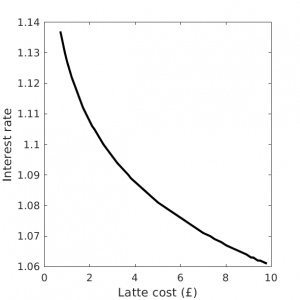
In fact, if you wanted a million pounds from a £3 latte habit, you'd need an interest rate of 9.6%. At an interest rate of 6%, your latte would have to cost £9.43.
Here are all the likely interest rates and latte cost combinations that will net you a million pounds by this method:
Minimum interest and cost combination required to accumulate a million pounds
As you can see, you'd require a very high interest rate or a very expensive latte.
Again, I'm not against saving money and making your coffee at home; I'm against the propagation of inaccurate mathematics.
I was thinking about inflation, but decided that there were too many factors to consider (your money would be worth less at the end, but also your latte would cost more and perhaps your interest rate would rise...)
Several people have mentioned that it's likely that people would only buy their latte on the way to work for 5 days a week. They'd also have some holiday days during the year. Considering how much shift work, zero-hours contracts, overtime, and working multiple jobs that people do, calculating these factors made my head hurt, so I choose instead to believe that these people go out on the weekends for a latte at the nice artisan café down the road.
It has also been pointed out that finding a bank account with a 6% rate of interest is nigh-on impossible. If I've interpreted the maths correctly, this means that you won't become a millionaire unless you start buying a more expensive latte.
If you'd like to get email updates from me, sign up to my mailing list!








 applied to an initial deposit of £
 should get you the same amount of money at the end of the year as a daily interest rate of
  applied every day, i.e. 365.25 times. Therefore, using the classic formula for compound interest (
 ):
):

 is the total money you have at the end,
  is the number of years that you want to save for.
 and use the above calculator.
 .
.